Search This Blog

Monday, January 21, 2013

How to Deploying Existing wsp file

Welcome to Designers Dairy blog here i have posted how to How to Deploying Wsp File through Command Prompt


Step1:

Goto-> Central Administrator


Step2:

 Central Administrator ->System Settings

Step3:

 Central Administrator ->System Settings->Farm Management


Step4:

 Central Administrator ->System Settings->Farm Management-> Manage Farm Solutions

Step5:

Manage Farm Solutions -> Deployed files will be shown there

Step6:

To Remove visys Click on the link

Step7:

Click on the Retract Solution and then click ->Remove Solution


Saturday, January 19, 2013

Deploying Wsp File through Command Prompt

Welcome to Designers Dairy blog here i have posted how to How to Deploying Wsp File through Command Prompt

C:\Program Files\Common Files\Microsoft Shared\Web Server Extensions\14\Resource
s>cd C:\Program Files\Common Files\Microsoft Shared\Web Server Extensions\14

C:\Program Files\Common Files\Microsoft Shared\Web Server Extensions\14>cd C:\Pr
ogram Files\Common Files\Microsoft Shared\Web Server Extensions\14\BIN


C:\Program Files\Common Files\Microsoft Shared\Web Server Extensions\14\BIN>stsa
dm  -o  addsolution  -filename "C:\Binc\MGA.BInc.SiteDefinition.Intranet.wsp"

Operation completed successfully.


C:\Program Files\Common Files\Microsoft Shared\Web Server Extensions\14\BIN>iisr
eset

Attempting stop...
Internet services successfully stopped
Attempting start...
Internet services successfully restarted

C:\Program Files\Common Files\Microsoft Shared\Web Server Extensions\14\BIN>

 SMRTSP2010DEV\administrator ;


 SP2010\administrator

Thursday, January 17, 2013

How to install Wsp file in Gallery

Welcome to Designers Dairy blog here i have posted how to How to install Wsp file in Gallery


Step1:

Go to -> Site Actions

Step2:

Site Actions->Site Settings

Step3:

Site Settings->Galleries

Step4:

Galleries -> Solutions

Step5:

 Click on Top Navigation Menu Tab Solutions ->Upload Document ->Wsp.file -> Click Activated

Step6:

Then

Go to ->Site Actions->Manage Site Feature -> Active the feature given in wsp File (ex:Visys)

Wednesday, January 9, 2013

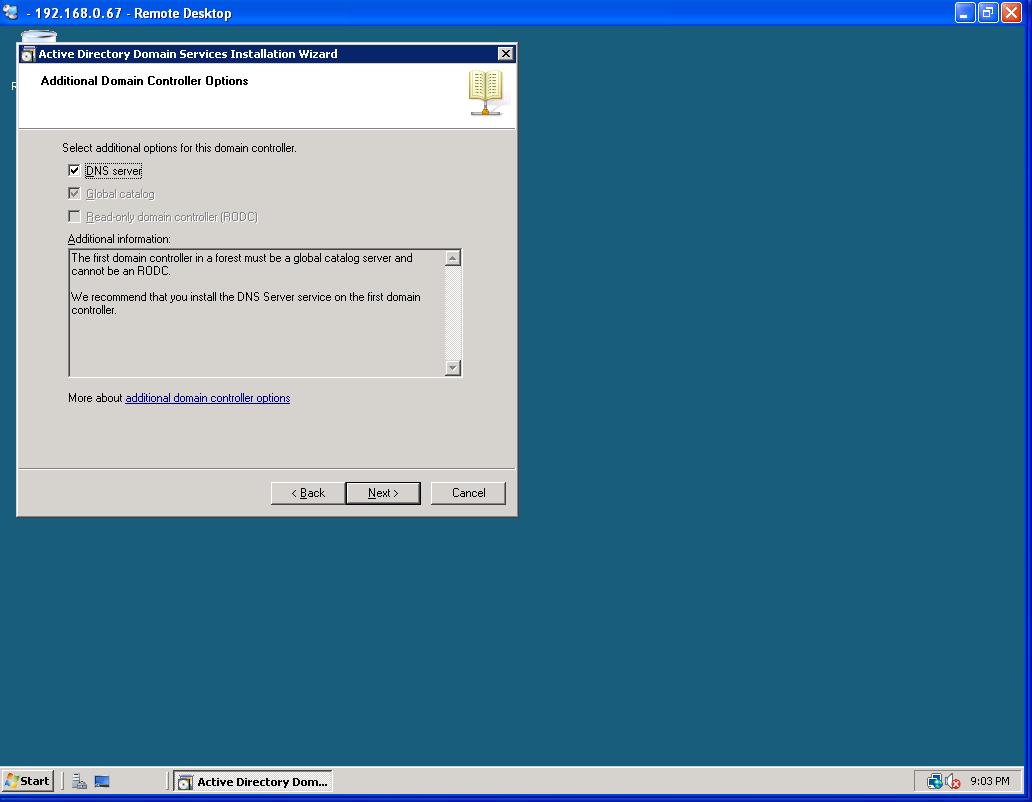
Creating an Active Directory Forest Covered

This article shows how to create an Active Directory forest covered in the article.   You could have another domain name, we used SteveSchofield.local as the test forest.  To start your forest, load your first VPC called DC1, login as Administrator and type DCPromo.  This will start the process.

Step1:

Type DC Promo in Search


Step2:

Type DC Promo in Search


After the box reboots, you'll have a working AD forest.  You would follow the process on DC2, instead of creating a new forest, you'll add an domain controller to an existing forest.    After both DC's are up and going, you can adjust the ip settings to fit the architecture listed article.   Once the forest is up and going, you can create two additional member servers and add them to the forest.  You just need to make sure the primary DNS settings on member servers are pointed to one of the DCs.   This will help resolve the domain, in our example it's SteveSchofield.local.


How to deploy wsp File in Visual Studio 2010 & 2013

Welcome to Designers Dairy blog here i have posted How to deploy wsp File in Visual Studio


SharePoint 2010 it is easy to create a .wsp file using visual studio 2010


Step:1

Go to Solution Explorer -> Select the Project (example: office 365)


Step2:

Click F4  Project Properties window will be open in the bottom


Step 3:


Select : Change 

          Sand boxed Solution  : True

           Site Url : office 365 Demo  link  or Central Admin port Url


Step4:

          
  Select the Project (example: office 365) Right click


Step5:

Select Build -> If Build is Success it will show Build is succeeded.


Step6:

Select Package -> If Package is Sucess it will show package is succeeded.


Step7:

Select Deploy  -> If Deploy is Sucess it will show Deploy is succeeded.


Monday, December 3, 2012

How to make Support Html 5 Tags in all Browsers

Welcome to Designers Dairy blog here i have posted how to make Support HTML 5 Tags in all  major

Browsers IE7, IE8.IE9,IE10.


Add this script into your head tag of your HTML File

<script src="http://html5shiv.googlecode.com/svn/trunk/html5.js"></script>


or Copy this code  make Html5.js

/*! HTML5 Shiv vpre3.6 | @afarkas @jdalton @jon_neal @rem | MIT/GPL2 Licensed
  Uncompressed source: https://github.com/aFarkas/html5shiv  */
(function(a,b){function h(a,b){var c=a.createElement("p"),d=a.getElementsByTagName("head")[0]||a.documentElement;return c.innerHTML="x<style>"+b+"</style>",d.insertBefore(c.lastChild,d.firstChild)}function i(){var a=l.elements;return typeof a=="string"?a.split(" "):a}function j(a){var b={},c=a.createElement,f=a.createDocumentFragment,g=f();a.createElement=function(a){if(!l.shivMethods)return c(a);var f;return b[a]?f=b[a].cloneNode():e.test(a)?f=(b[a]=c(a)).cloneNode():f=c(a),f.canHaveChildren&&!d.test(a)?g.appendChild(f):f},a.createDocumentFragment=Function("h,f","return function(){var n=f.cloneNode(),c=n.createElement;h.shivMethods&&("+i().join().replace(/\w+/g,function(a){return c(a),g.createElement(a),'c("'+a+'")'})+");return n}")(l,g)}function k(a){var b;return a.documentShived?a:(l.shivCSS&&!f&&(b=!!h(a,"article,aside,details,figcaption,figure,footer,header,hgroup,nav,section{display:block}audio{display:none}canvas,video{display:inline-block;*display:inline;*zoom:1}[hidden]{display:none}audio[controls]{display:inline-block;*display:inline;*zoom:1}mark{background:#FF0;color:#000}")),g||(b=!j(a)),b&&(a.documentShived=b),a)}var c=a.html5||{},d=/^<|^(?:button|form|map|select|textarea|object|iframe|option|optgroup)$/i,e=/^<|^(?:a|b|button|code|div|fieldset|form|h1|h2|h3|h4|h5|h6|i|iframe|img|input|label|li|link|ol|option|p|param|q|script|select|span|strong|style|table|tbody|td|textarea|tfoot|th|thead|tr|ul)$/i,f,g;(function(){var c=b.createElement("a");c.innerHTML="<xyz></xyz>",f="hidden"in c,f&&typeof injectElementWithStyles=="function"&&injectElementWithStyles("#modernizr{}",function(b){b.hidden=!0,f=(a.getComputedStyle?getComputedStyle(b,null):b.currentStyle).display=="none"}),g=c.childNodes.length==1||function(){try{b.createElement("a")}catch(a){return!0}var c=b.createDocumentFragment();return typeof c.cloneNode=="undefined"||typeof c.createDocumentFragment=="undefined"||typeof c.createElement=="undefined"}()})();var l={elements:c.elements||"abbr article aside audio bdi canvas data datalist details figcaption figure footer header hgroup mark meter nav output progress section summary time video",shivCSS:c.shivCSS!==!1,shivMethods:c.shivMethods!==!1,type:"default",shivDocument:k};a.html5=l,k(b)})(this,document)

What Is HTML 5

What is HTML5 ?

                     Its a  new standard for HTML.

HTML5 is still a work in progress. However, the major browsers support many of the new HTML5

elements and APIs.
 
The previous version of HTML, HTML 4.01, came in 1999. The web has changed a lot since then.


Validating to select in sequencial order using angular

    < input type = "checkbox" (change) = "handleSelectTaskItem($event, taskItem)" [checked] = " taskItem . i...